AI built for legal work, not bolted on.
Not a chatbot in a sidebar. LegalEdge AI is designed to live inside every module: extracting deadlines from filings, drafting documents from matter data, summarizing long transcripts, and proposing billing narratives.
Start Free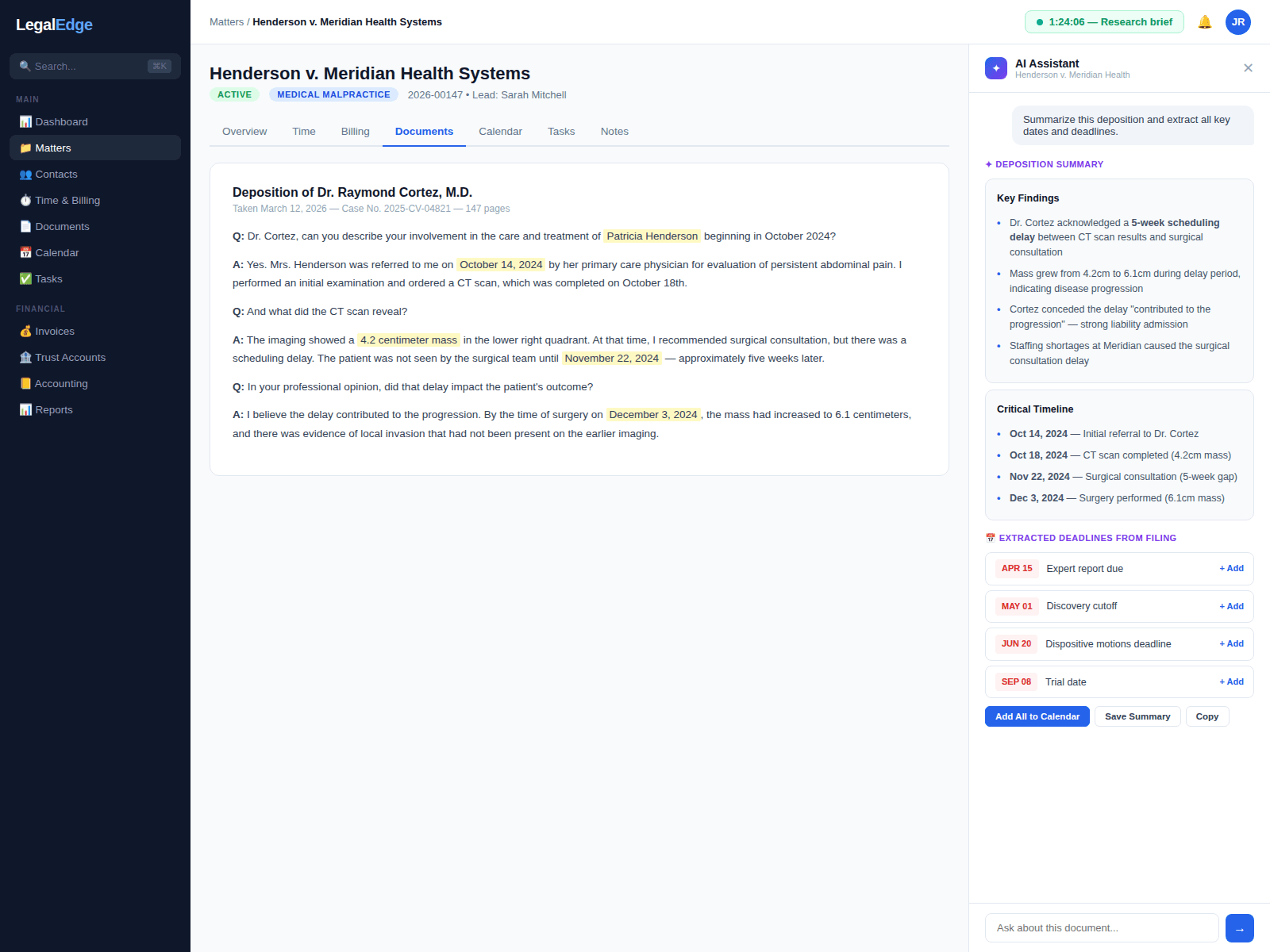
Intelligence where the work already happens
Deadline extraction
Upload a court filing and the assistant is designed to identify the deadlines, hearing dates, and response windows, then propose calendar entries for review.
Long-document summarization
Drop a deposition transcript, medical record, or contract into LegalEdge and receive a structured summary with key passages highlighted for review.
Billing narrative drafting
The assistant is designed to draft defensible time entries from the day's activity log so the end-of-day review is a quick approval, not a blank page.
Built into every module
AI is designed to live inside calendar, documents, billing, and case management, surfacing suggestions where the work already happens instead of a separate tab.
How the assistant is designed to work
Live product screenshots will be added once the AI surface area is ready to share publicly.
AI-native, not bolted on
Most legal software vendors layer a chatbot onto an older codebase and call it AI. LegalEdge is being built with AI embedded in the workflow itself, so suggestions appear inline, in context, alongside the matter, the calendar, the invoice, or the document, instead of in a separate chat window.
- AI suggestions designed to appear inline, in the matter context
- Aware of jurisdiction, matter, and client when proposing content
- Built into the workflow rather than added to it
Extract deadlines from court filings
Upload a scheduling order, case management order, or other court filing. The assistant is designed to read the document, identify dates and deadlines, map them to the relevant jurisdiction's rules, and propose calendar entries with reminder chains.
- PDF, Word, and scanned-document inputs via OCR
- Designed to recognize implicit deadlines such as 'within 30 days of service'
- Cross-checks extracted dates against existing calendar entries
Draft documents from matter data
Start with a prompt or an existing template and let the assistant produce a first draft that incorporates matter facts, client details, and jurisdiction-appropriate language. Attorneys review and refine instead of starting from a blank page.
- Pulls facts directly from matter data, designed to reduce re-entry
- Built to learn firm-preferred style, formatting, and clause language
- Supports motions, discovery responses, demand letters, and correspondence
Summarize cases for faster decision-making
New to a case? Preparing for a hearing? The assistant is designed to generate a structured case summary covering procedural history, key facts, outstanding deadlines, and recent activity, from a large body of matter data.
- Chronological timeline of filings, communications, and events
- Highlights unresolved issues and upcoming deadlines
- Exportable summaries for client meetings and internal reviews
Draft billing narratives that survive review
Activity captured throughout the day is designed to feed the assistant so it can draft time entries with detailed, defensible narratives. Attorneys review and submit in a single click, rather than reconstructing the day from memory.
- Narratives designed to follow LEDES and UTBMS billing standards
- Built to avoid vague language that triggers client write-downs
- Surfaces small activities that are easy to forget at end of day
Private and secure by design
LegalEdge AI is designed so that client data is not used to train third-party models. Interactions are processed through isolated, encrypted environments with audit logging. Confidentiality is treated as a design constraint, not a feature to opt into.
- Designed for zero-retention with AI providers where supported
- Audit logging on AI interactions
- Firm administrators control which AI features are enabled per role
Works with the documents you already have
LegalEdge AI is designed to process PDFs, Word documents, Excel spreadsheets, scanned images, and emails, with no special formatting required. Upload what you have, whether that is a long medical record or a one-paragraph court order.
Ready to Bill More and Stress Less?
Start free. No credit card required. Upgrade anytime.
Free migration from Clio, PracticePanther, MyCase, and more.