Document automation built for legal work.
Jurisdiction-aware forms, an AI template builder, conditional logic, auto-populated merge fields, and unlimited e-signatures. Designed to make document drafting fast and consistent.
Start Free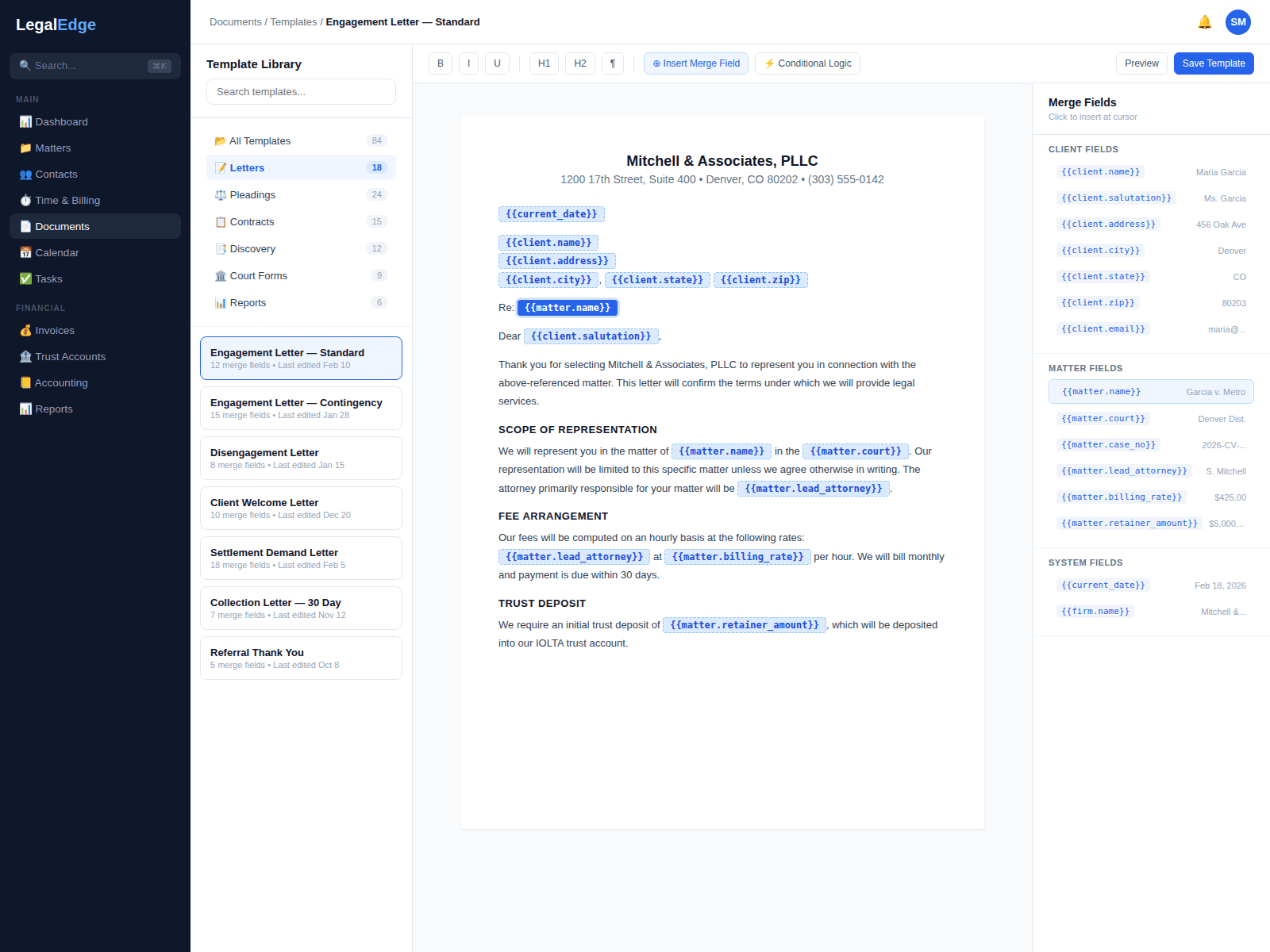
Documents should generate themselves
Industry studies consistently put document drafting among the largest non-billable time sinks. LegalEdge is designed to give that time back.
Jurisdiction-aware form library
Court forms, pleading templates, contracts, and practice-specific documents designed to be kept current as rules and requirements change.
AI-assisted template builder
Upload a Word document or PDF and the AI template builder is designed to identify variable fields, suggest merge field placements, and convert it into a reusable template.
Conditional logic
Templates can show, hide, or modify content based on matter data. One template is designed to handle dozens of variations.
Unlimited e-signatures
Built-in e-signatures designed to remove the per-envelope fee math from the workflow. Send retainer agreements, settlement releases, and closing documents from inside the platform.
From blank page to signed document
Live product screenshots will be added once the document automation surface area is ready to share publicly.
E-signatures designed into the platform
Many legal platforms charge per signature or require a third-party integration. LegalEdge is designed to include unlimited e-signatures so the marginal cost of sending one more document is zero.
- Unlimited e-signature requests included with the platform
- Built to comply with ESIGN and UETA
- Multi-party signing with custom signing order and reminders
- No per-envelope fees in the way of using the workflow
Generate documents in seconds
Select a template, choose a matter, and generate. LegalEdge is designed to pull client names, addresses, case numbers, dates, financial figures, and other data points from the matter record so the first draft is consistent and free of typos.
- One-click generation that pulls data from the matter record
- Merge fields auto-populate names, dates, amounts, and case details
- Generated documents are editable in the built-in editor
- Version control tracks revisions with full history
Extensive jurisdiction coverage
LegalEdge is being built around a continuously maintained library of legal forms spanning state, federal, and specialized tribunal jurisdictions. The goal is that the form a firm needs is already in the library, vetted, formatted, and ready to populate.
- Coverage across states, federal courts, and specialized tribunals
- Forms maintained against changes in rules and requirements
- Practice-area-specific collections for litigation, family, corporate, and more
- Jurisdiction inferred from matter data where possible
The AI template builder
Firms have templates that no library covers: a specific retainer agreement, a particular demand letter format, a closing checklist. Upload a Word document or PDF and the AI template builder is designed to identify variable fields, suggest merge field mappings, and convert it into a reusable template without coding.
- Upload any Word or PDF to start the conversion
- AI suggests merge field placements
- Drag-and-drop editor for adjusting field positions and logic
- Template sharing across the firm with role-based access
Conditional logic for complex documents
Real legal documents are not one-size-fits-all. A marital settlement agreement varies depending on whether there are children. A corporate formation document varies by entity type. LegalEdge templates are designed to support conditional sections that show, hide, or modify content based on matter fields.
- If/then logic based on matter fields, custom fields, or tags
- Repeating sections for multiple parties, assets, or claims
- Calculated fields for financial figures, deadlines, and dates
- Nested conditions for multi-variable documents
Clause library for firm-wide consistency
Build a library of approved clauses (indemnification, limitation of liability, standard representations) and insert them into templates. When a clause is updated, every template that references it is designed to reflect the change.
- Centralized clause library with version control and approval workflows
- One-click clause insertion into any template or document
- Global updates: change a clause once, propagate everywhere
- Clause usage tracking across templates
Documents connected to the rest of the practice
Document automation works best when it pulls data from the rest of the platform. Templates are designed to connect to matters, contacts, billing, and intake so each first draft is accurate.
Matter Management
Merge fields pull case numbers, parties, dates, and custom fields from the matter, designed to remove copy-paste from the workflow.
Billing and Invoicing
Engagement letters and retainer agreements pull fee terms, billing rates, and payment schedules from the billing configuration.
Client Portal
Documents for signature route through the client portal so clients review, sign, and return without leaving their dashboard.
Client Intake and CRM
Intake form data flows directly into templates, so a signed engagement letter can follow a lead-to-client conversion immediately.
Automate the document workflow
Start free. No credit card required. Unlimited e-signatures from day one.
Free migration from Clio, PracticePanther, MyCase, and more.