Turn captured time into collected revenue.
Customizable invoices, one-click online payments, automated reminders, and batch billing, all designed to move work from the timesheet to the bank without leaving the platform.
Start Free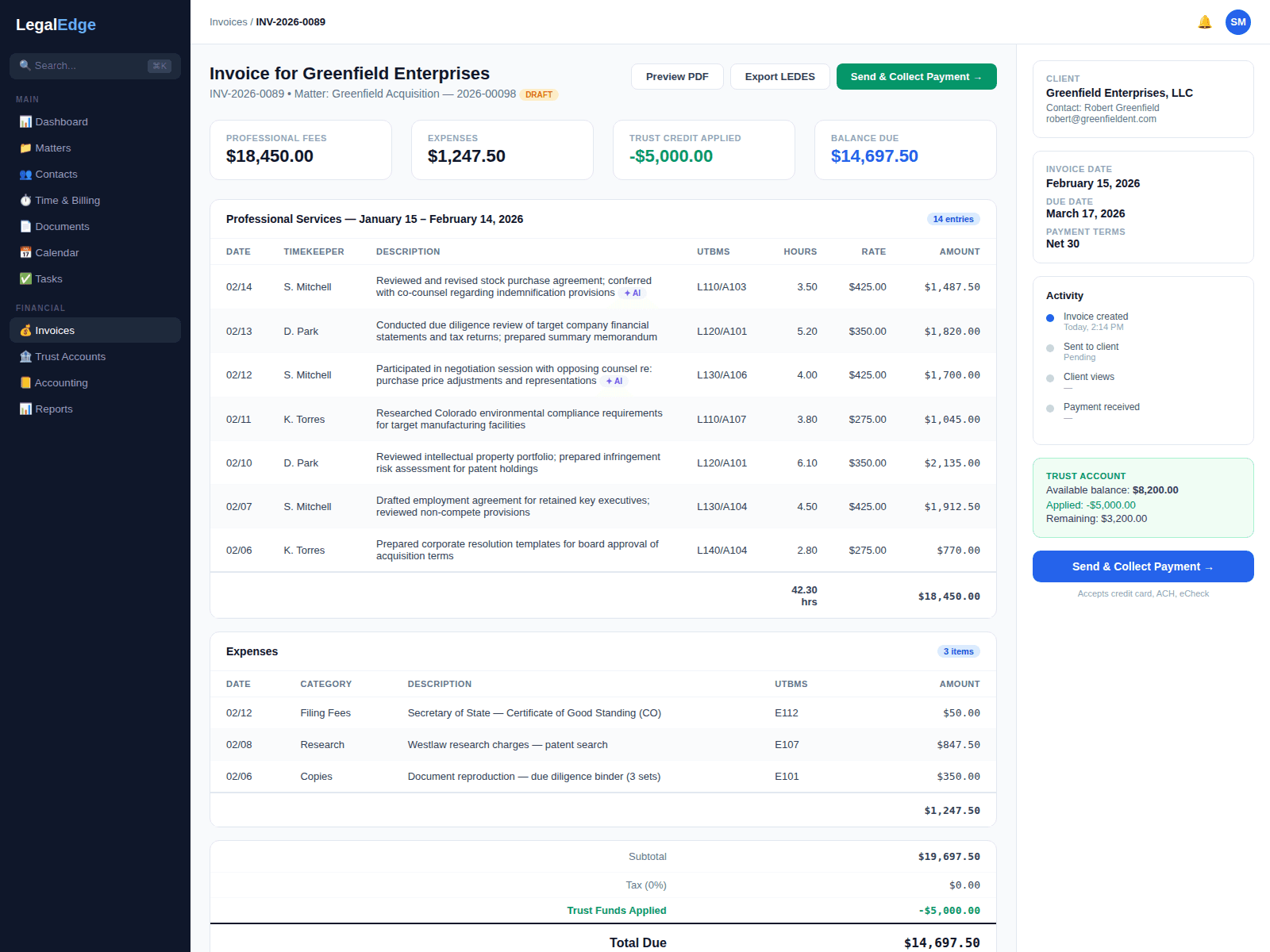
Billing should not be the hardest part of practicing law
LegalEdge is designed to compress the time spent on invoicing and accelerate the time between sending and getting paid.
Designed to shorten time to payment
Online payment links, automated reminders, and a frictionless checkout are built to remove the friction between a finished invoice and a paid one.
Customizable invoices
Choose from a library of templates or build your own. Add a logo, customize line item formats, include trust account details, and match the look your clients expect.
One-click online payments
Every invoice can include a secure payment link. Clients pay by credit card, eCheck, or ACH directly from email or the client portal. No extra account to create.
Automated payment reminders
Polite, professional reminders are designed to send at intervals you define until the invoice is paid, so no one on your team has to chase balances by hand.
From time entry to payment, with as little friction as possible
A walkthrough of what the billing flow is designed to do. Live product screenshots will replace the descriptions below once that surface area is ready to share publicly.
Generate invoices from captured time in seconds
Select a matter, review unbilled time and costs, and generate. LegalEdge is built to pull every approved time entry and expense, apply your billing rates, handle flat-fee or contingency arithmetic, and produce a polished invoice ready for review.
- One-click invoice generation from unbilled time and costs
- Automatic rate application by timekeeper, matter type, or client
- Support for flat fee, contingency, and hybrid billing arrangements
- Pre-bill editing so adjustments happen before the client ever sees it
Batch invoicing for month-end billing runs
Stop generating invoices one at a time. Batch invoicing lets you select any combination of matters, clients, or practice areas and generate the run in one operation, with a review queue for bulk edits before sending.
- Generate invoices for an entire firm in a single batch operation
- Filter by practice area, responsible attorney, client, or date range
- Batch review queue with inline editing for fast approval
- Recurring invoices for retainer and subscription clients
LEDES, UTBMS, and compliance billing codes
Corporate and insurance clients often require standardized billing. LegalEdge is designed to support LEDES 1998B and 2.0 formats, UTBMS task and activity codes, and e-billing submission to major platforms, with AI-assisted code suggestion from time entry narratives.
- LEDES 1998B and LEDES 2.0 electronic billing support
- UTBMS task codes, activity codes, and expense codes
- AI-assisted code suggestion from time entry narratives
- Submission flows for Tymetrix, Legal Tracker, and similar platforms
Split billing and multi-party invoicing
Complex matters often involve multiple responsible parties. Split billing lets you divide fees and costs by percentage, by timekeeper, by task code, or by any custom allocation, with separate invoices generated for each responsible party from a single matter.
- Split billing by percentage, timekeeper, task, or custom rule
- Separate invoices generated per responsible party
- AR aging tracked independently per responsible party
- Reallocation tools for mid-matter billing arrangement changes
Automated payment reminders that follow up for you
The most common reason firms get paid late is that they stop following up. LegalEdge is built to never forget. Configure reminder sequences that send branded emails at your chosen intervals, with the payment link, outstanding balance, and a courteous message.
- Customizable reminder templates with firm branding
- Multi-step sequences such as 7-day, 14-day, 30-day, and final notice
- Reminders pause automatically when payment is received
- Escalation rules notify a partner when an invoice passes a threshold
Real-time accounts receivable dashboard
Know where the money is. The AR dashboard shows outstanding invoices by age, client, matter, and responsible attorney, with one-click drill-down to any invoice and exportable aging reports for partner meetings.
- AR aging buckets: current, 30, 60, 90, and 120+ days
- Filter by responsible attorney, practice area, or client
- One-click drill-down from aging report to individual invoice
- Automated write-off workflows for uncollectible balances
Billing connected to the rest of your practice
When time tracking, billing, accounting, and payments live in one platform, work is designed to flow between them without losing money along the way.
Time Tracking
Approved time entries flow directly into invoices. Passive capture is designed so every billable minute is accounted for before billing begins.
Trust Accounting
Apply trust funds to invoices, and LegalEdge is designed to create the matching journal entries and update the three-way reconciliation automatically.
Built-in Accounting
Invoices, payments, and write-offs are designed to post directly to the general ledger. No exporting, no separate accounting tool to reconcile.
Client Portal
Clients view invoices, make payments, and download receipts from a branded portal, with the goal of making billing transparent rather than opaque.
Start collecting faster
Start free. No credit card required. Bring your billing into one platform.
Free migration from Clio, PracticePanther, MyCase, and more.