Email organized by matter.
Attorneys spend a meaningful slice of every day managing email. LegalEdge is designed to provide a built-in email client that uses AI to file messages to the right matter, with no plugins to maintain and no emails lost in personal inboxes.
Start Free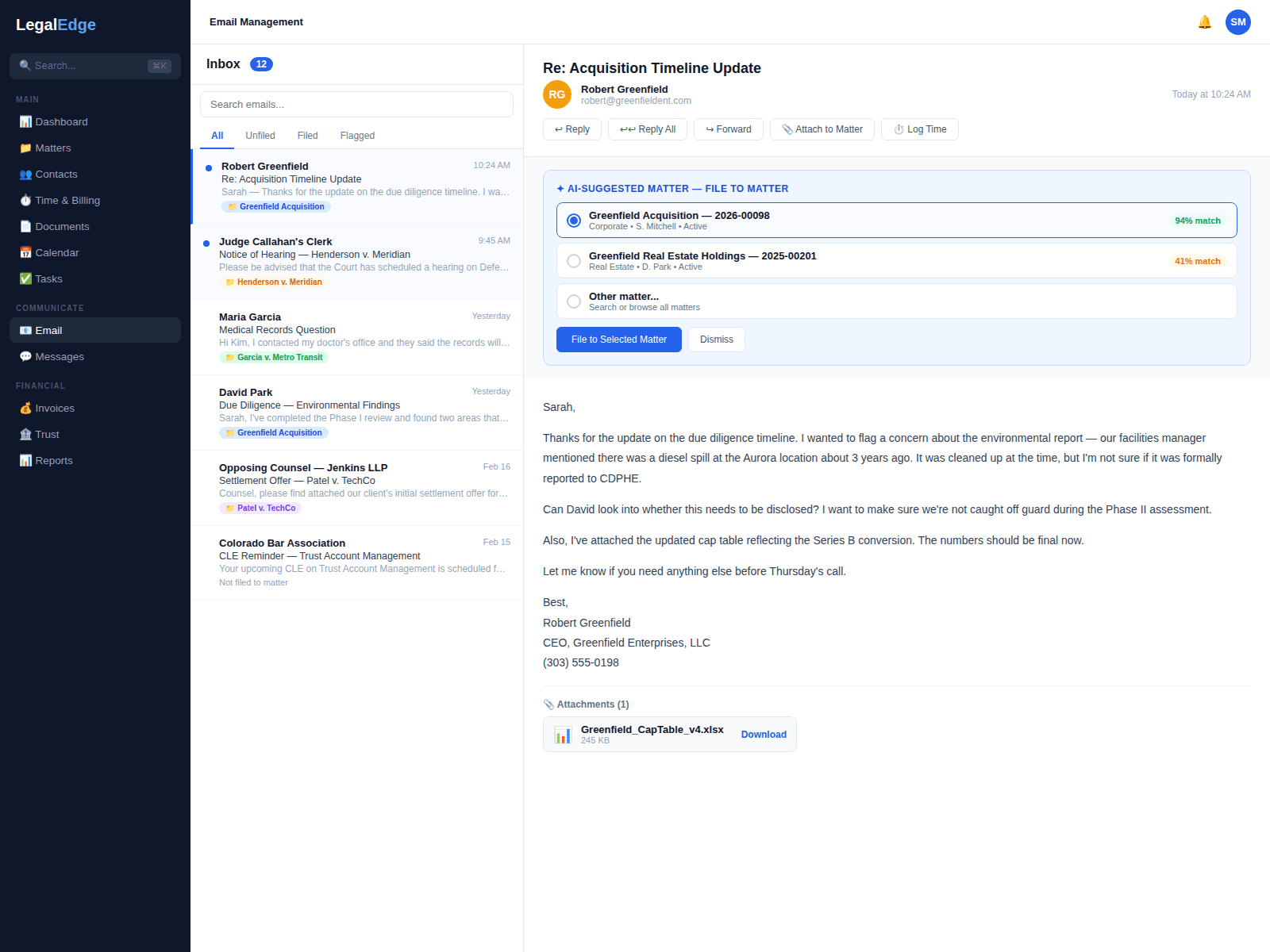
Email designed to work the way lawyers do
AI-assisted filing to matters
LegalEdge is designed to read sender, subject, and content to file each incoming and outgoing email to a matter, with manual override one click away.
Built-in email client
Send and receive email directly inside LegalEdge, designed to remove the dependency on plugins and browser extensions.
Email templates
Reusable templates for common communications (client updates, scheduling confirmations, demand letters) with merge fields pulling from the matter record.
Open and click tracking
Know when a client opens an email, clicks a link, or downloads an attachment, so follow-ups happen at the right moment.
How email management is designed to work
Live product screenshots will be added once the email surface area is ready to share publicly.
Every email connected to the right matter
Manually filing incoming and outgoing email to the correct matter is a meaningful daily tax on attorney time. LegalEdge AI is designed to analyze sender, recipients, subject, and body to file each message to a matter automatically, with one-click reassignment when needed.
- AI-assisted auto-filing across incoming and outgoing email
- Manual override with one-click reassignment
- CC and BCC recipients included in the filing logic
No plugin, no IT ticket
Many legal tools require an Outlook plugin that breaks on update or a Chrome extension that slows the browser. LegalEdge is designed to provide a full email client built into the platform: connect Gmail or Microsoft 365 and start working.
- Connect Gmail or Microsoft 365 with OAuth
- No plugins, extensions, or desktop software to install
- Works on desktop, tablet, or mobile browser
Templates that compress repeat communication
How many times a week does an attorney retype the same case update? Templates with merge fields are designed to pull client name, matter number, next court date, and outstanding balance from the matter record, so one click sends a personalized message.
- Drag-and-drop template builder with merge field support
- Templates shared across the firm or kept per-attorney
- Schedule emails to send at a specific date and time
Visibility into whether messages are read
LegalEdge is designed to track email opens, link clicks, and attachment downloads so settlement offers and demand letters do not vanish into a black hole.
- Notifications when an email is opened
- Track link clicks and attachment downloads per recipient
- Engagement history stored on the matter timeline
Search across every email in every matter
LegalEdge is designed to index emails across matters with full-text search. Filter by date range, sender, recipient, matter, attachment type, or keyword.
- Full-text search across email in all matters
- Filter by sender, recipient, date range, attachment type, and matter
- Search results show previews with highlighted keyword matches
Complete email audit trail
Every email sent, received, opened, and filed is designed to be logged with a timestamp and user attribution, so litigation holds and compliance reviews have a searchable record.
- Immutable audit log for every email action
- Litigation hold support to prevent email deletion
- Exportable communication logs for compliance and discovery
Designed to work with Gmail and Microsoft 365
Keep your existing email address and provider. LegalEdge is designed to connect to Gmail and Microsoft 365 via OAuth, with no passwords stored and no IMAP configuration required.
Ready to Bill More and Stress Less?
Start free. No credit card required. Upgrade anytime.
Free migration from Clio, PracticePanther, MyCase, and more.