Automate the work around the work.
Attorneys did not go to law school to manually assign tasks, chase status updates, and send reminder emails. The workflow builder is designed to take that overhead off the team.
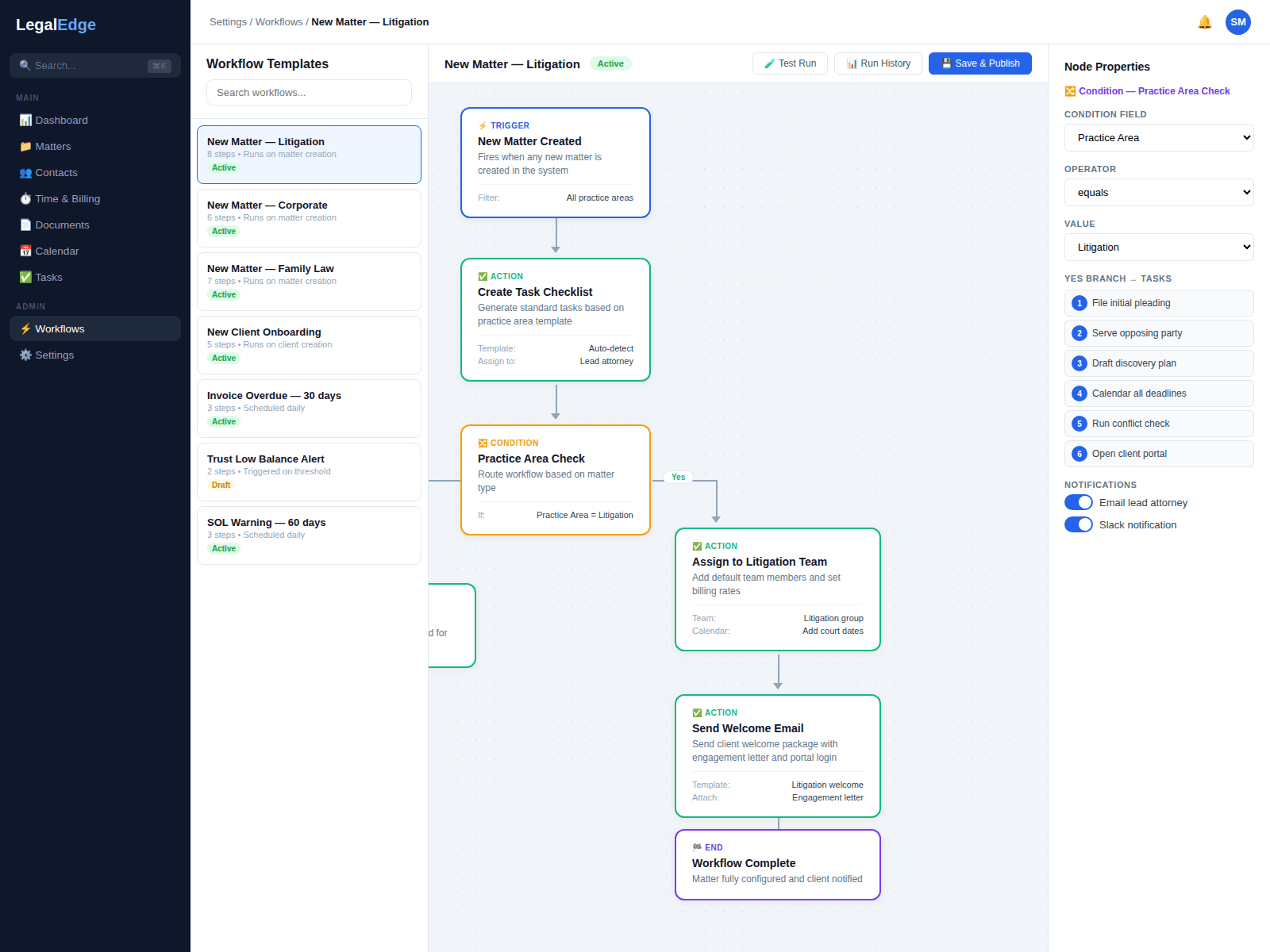
Designed to compress the admin tax on every new matter
Opening a new matter, assigning tasks, generating documents, and notifying clients is meant to happen in minutes rather than across a half-day of manual steps.
Visual workflow builder
Drag and drop your firm's processes into repeatable workflows. No code required. If you can sketch the flow on a whiteboard, the builder is designed to let you build it.
Triggers and conditions
Workflows are designed to fire automatically on events: a new matter, a status change, an approaching deadline, a document upload. Branch logic by matter type, practice area, or custom field.
Task auto-assignment
Tasks created by a workflow are designed to be assigned to the right person automatically, so paralegals, associates, and staff get their work without manual delegation.
Deadline chains
Dependent deadlines that cascade automatically. When a court date moves, downstream tasks are designed to adjust without manual recalculation.
Build once, run every time
Live product screenshots will be added once the workflow surface area is ready to share publicly.
Drag-and-drop workflow designer
Build workflows visually with a canvas-based designer. Add triggers, conditions, actions, and branching logic by dragging blocks into place. Preview the flow before activation, and edit live workflows without disrupting matters already in progress.
- No-code visual builder with drag-and-drop blocks
- Pre-built templates for common practice areas
- Version history with rollback support
Event-driven triggers
Workflows are designed to fire on real events in the practice: a new matter opened, a status changed, a deadline approaching, a payment received, a document uploaded. Define the trigger, and the rest is designed to follow.
- Built-in event triggers across the platform
- Conditional branching based on matter data
- Schedule-based triggers for recurring tasks
Document generation and email notifications
Document generation can be part of any workflow. When a new personal injury matter opens, the retainer agreement, medical authorization forms, and welcome letter are designed to be generated and routed to the client portal automatically.
- Auto-generate documents from templates with merge fields
- Automated email notifications with dynamic content
- Client portal uploads triggered by workflow steps
Status updates and notifications
Keep everyone in the loop without anyone doing the looping. When a task is completed, the matter status is designed to update, the next task is assigned, and the responsible attorney is notified.
- Automatic matter status progression
- Slack, email, and in-app notification channels
- Client-facing status updates via the portal
Cascading deadline chains
Define deadline relationships and LegalEdge is designed to calculate them. Set a trial date, and discovery cutoffs, motion deadlines, and deposition windows are designed to populate. If the judge moves the trial, downstream deadlines are designed to recalculate.
- Dependent deadline calculations with court-rule awareness
- Automatic recalculation when key dates change
- Early warning alerts before deadlines approach
Designed to connect to your stack
Workflows do not have to stop at the platform boundary. Trigger Slack messages, send data to Zapier, update your CRM, or call your own API endpoints, so the broader stack stays in step.
Reclaim hours every week
Start free. No credit card required. Automate the repeatable processes inside your firm.
Free migration from Clio, PracticePanther, MyCase, and more.